AI for Small Business: Practical Ways to Save Time
AI for Small Business: Where Does It Actually Save Time?
AI for small business can save time by helping owners handle repetitive tasks such as drafting emails, preparing content, summarizing information, organizing data, and answering common customer questions. The biggest benefits come when AI is applied to a clear, repeatable process with measurable results. However, the real savings depend on accuracy, review time, tool costs, and how well the system fits your business.
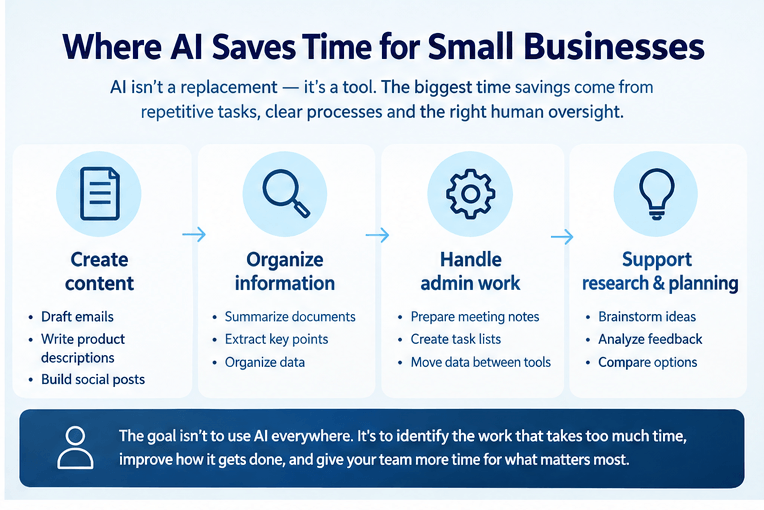
For small businesses, the goal is not to use AI everywhere. It is to identify the work that takes too much time, improve how it gets done, and give people more time to focus on customers, sales, and business growth.
How Can Small Businesses Use AI to Save Time?
Small businesses can use AI to speed up everyday work, especially tasks that follow a familiar pattern. AI is most useful when it helps employees complete a task faster without reducing the quality of the result.
1. Writing emails and business content
AI can draft customer emails, product descriptions, blog outlines, social media captions, and internal documents. Instead of starting with a blank page, an employee can review and improve a first draft.
For example, a small online store could use AI to draft product descriptions from verified product details. The owner would still check specifications, prices, and claims before publishing.
2. Organizing information
AI can summarize long documents, extract key points, classify incoming requests, and help organize information from spreadsheets. This can reduce the time spent reading and sorting information manually.
However, business owners should check important figures, names, dates, and conclusions against the original records.
3. Repetitive administrative work
AI can help prepare meeting summaries, create task lists, draft standard operating procedures, and organize notes. When connected to suitable business software, automation can move information between systems or trigger the next step in a process.
This distinction matters: AI generates or interprets information, while automation executes predefined actions. Combining the two can make a workflow more efficient, but the setup must be tested.
4. Research and planning
AI can help brainstorm campaign ideas, group customer feedback, compare options, and create initial research summaries. It can give a small team a useful starting point without requiring hours of manual preparation.
It should not replace verification of market facts, legal requirements, competitor claims, or other information that affects business decisions.
The practical rule is simple: use AI to accelerate the work, then apply human judgment where accuracy, trust, or money is involved.
How to Use AI in a Small Business Without Creating More Work
The best way to start is with one process, not a complete business transformation. A small, controlled experiment makes it easier to measure the benefits and identify problems before expanding.
Follow these five steps.
Step 1: Identify a repetitive task
Look for work that happens frequently, follows similar steps, and consumes noticeable staff time.
Examples include answering the same questions, preparing weekly reports, formatting product listings, and drafting routine emails.
Avoid starting with a complicated process that involves sensitive information, many exceptions, or decisions that require expert judgment.
Step 2: Record your current results
Before introducing AI, measure how long the task takes and how often it needs correction.
For example, record the average time required to prepare ten product listings, including research, writing, checking, and uploading.
This gives you a baseline for comparison. Without one, it is difficult to tell whether AI actually improved the process.
Step 3: Choose a suitable AI tool
Select a tool based on the task, your existing software, your budget, and your data protection requirements.
A writing assistant may be sufficient for drafting content. A spreadsheet assistant may help organize business data. A workflow automation platform may be more suitable when information needs to move between applications.
Do not pay for advanced features before confirming that the basic workflow delivers value.
Step 4: Test the workflow with human review
Use AI on a small batch of real but appropriately protected work. Give it clear instructions and provide examples of acceptable results.
Check the output for factual errors, missing details, inconsistent formatting, and unsuitable language. Record how much editing is needed.
If the tool repeatedly produces errors that take longer to correct than the original task, revise the workflow or choose another approach.
Step 5: Compare the results and decide whether to expand
Compare the new process with your baseline. Include review time, subscription fees, setup work, and ongoing maintenance.
If the process consistently saves time without creating unacceptable risks, document the steps and expand gradually. If it does not, adjust or stop the experiment.
This approach keeps AI adoption practical. Every new tool should solve a specific problem rather than add another layer of work.
What Are the Best AI Tools for Small Business in 2026?
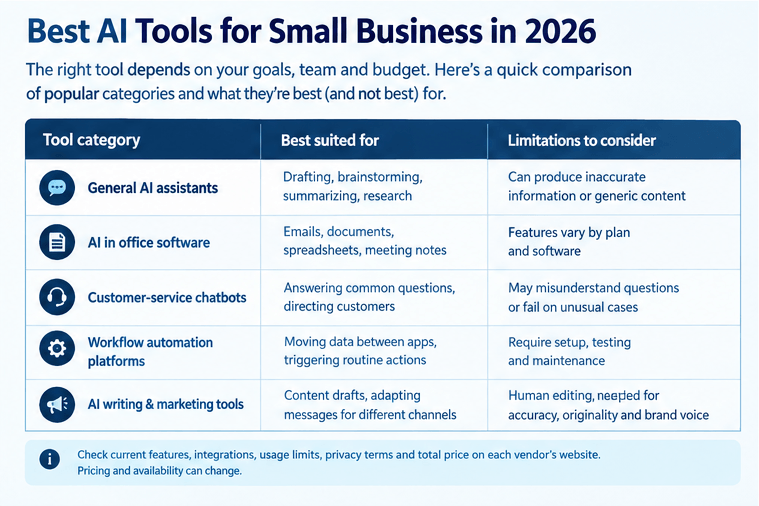
The best AI tools for small business in 2026 depend on what you need to accomplish. There is no single tool that is automatically best for every business.
Instead of choosing based on popularity, compare tools by task.
Tool category
General AI
assistants
AI features in office software
Customer-service chatbots
Workflow automation platforms
Best suited for
Drafting, brainstorming, summarizing, and initial research
Working with emails, documents, spreadsheets, and meeting notes
Answering approved FAQs and directing customers
Moving information between applications and triggering routine actions
Limitations to consider
Can produce inaccurate information or generic content
Availability and capabilities depend on the software plan
May misunderstand questions or fail on unusual cases
Require configuration, testing, and maintenance
Workflow automation platforms
Creating content drafts and adapting messages for different channels
Large Call to Action Headline
When comparing individual products, check their current features, integration options, usage limits, privacy terms, support, and total price. Pricing and feature availability can change, so verify them on each vendor's official website before purchasing.
A useful starting point is Google's AI guidance for small businesses, which describes business uses such as writing assistance and data analysis.
For a small team, using AI features already included in existing software may be more practical than introducing a separate platform. The right choice is the one that improves a real workflow at a reasonable total cost.
How Much Can a Small Business Save With AI?
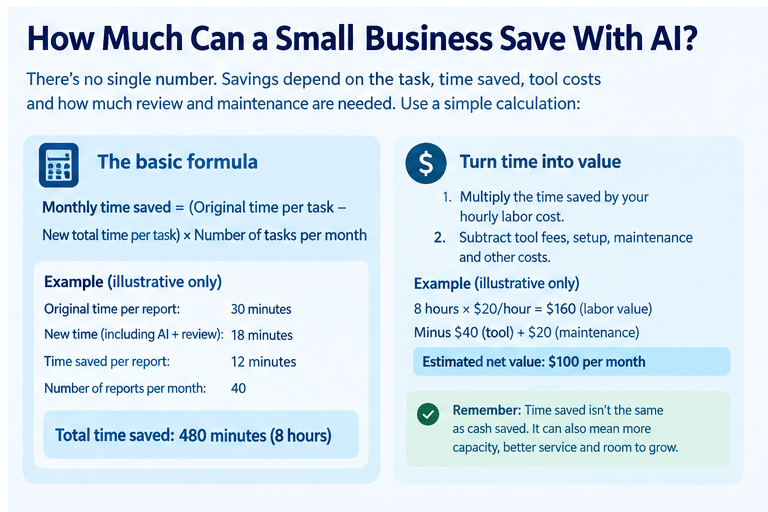
There is no universal amount that every small business can save with AI. Results depend on the task, how often it occurs, the time saved per task, the quality of the output, and the cost of reviewing and maintaining the system.
A simple calculation is more useful than an unsupported promise of a particular percentage.
Net time saved per month:
Monthly time saved = (Original time per task − New total time per task) × Number of tasks per month
New total time should include AI processing where relevant, human review, corrections, and additional handling.
For example, suppose a business prepares 40 reports each month.
Original time: 30 minutes per report.
New time, including AI and review: 18 minutes per report.
Time saved: 12 minutes per report.
Monthly time saved: 480 minutes, or 8 hours.
These figures are an illustrative example, not a verified business result.
The business saves eight hours of labor time per month before accounting for setup and ongoing maintenance. If the workflow required three hours to configure during the first month, the initial net time saving would be five hours, assuming no other additional costs.
To calculate the financial value, multiply the time saved by the appropriate hourly labor cost. Then subtract software fees, implementation costs, maintenance, and other incremental expenses.
For example, if the eight hours saved are valued at $20 per hour, the gross monthly labor value is $160. If the tool costs $40 per month and ongoing maintenance costs $20, the estimated net value is $100 per month before any other costs.
This is a hypothetical calculation, not a prediction of what a business will achieve.
Also distinguish between time saved and cash saved. If an employee uses the freed-up time to serve more customers or complete other work, the business may gain capacity without reducing payroll.That can be valuable, but it is not the same as an immediate reduction in expenses.
Does AI Replace Employees?
AI does not automatically replace employees. In many small businesses, it is more useful as a tool that helps employees complete routine work faster and focus on tasks that require judgment, communication, and problem-solving.
For example, AI may draft a response to a common customer question, while an employee handles complaints, unusual requests, and sensitive situations. It may prepare a report, while a manager interprets the results and decides what action to take.
The impact depends on the role, the workflow, the quality of the tool, and how the business chooses to use the additional capacity.
Business owners should evaluate tasks rather than assume that an entire job can be automated. Some tasks may be suitable for automation, while others depend on experience, accountability, relationships, or physical work.
Employees also need clear guidance about approved tools, data handling, review responsibilities, and when to escalate a problem.
A responsible approach is to identify where AI can remove unnecessary work while keeping people accountable for important decisions. The goal should be better business performance, not automation for its own sake.
How Can AI Customer Service Help a Small Business?
AI customer service for small business can help answer common questions, provide basic information outside normal business hours, sort incoming requests, and direct customers to the right person.
A chatbot might answer questions about delivery policies, business hours, booking procedures, or return instructions. This can reduce repetitive inquiries and help customers find information more quickly.
However, a chatbot is only as useful as the information and rules behind it.
Where AI customer service works well
AI customer service is often a good fit when:
Questions are frequent and predictable.
Answers can be based on approved business information.
Customers can easily reach a human when necessary.
The system can recognize when it does not know the answer.
Where human support is still necessary
A human should handle situations involving disputed payments, complex complaints, unusual orders, sensitive personal information, or decisions that require exceptions to business policies.
AI can misunderstand a question, provide outdated information, or sound confident while giving an incorrect answer. A chatbot should not invent refund policies, promise delivery dates without reliable data, or claim that an issue has been resolved when it has not.
Businesses should test common questions and difficult edge cases before launch. They should also monitor unanswered questions, incorrect responses, escalation rates, customer feedback, and resolution quality.
Make it clear when customers are interacting with AI, and provide a straightforward way to contact a person.
For guidance on managing AI risks, the National Institute of Standards and Technology's AI Risk Management Framework offers a useful reference for evaluating and managing risks throughout an AI system's use.
What Are the Risks of Using AI in a Small Business?
AI can introduce risks if it is used without clear boundaries and review procedures.
Inaccurate information: AI may produce incorrect facts, calculations, or recommendations. Verify important information before acting on it or sharing it with customers.
Privacy and security: Employees may accidentally share customer details, financial records, confidential documents, or business information with an unsuitable tool. Review the provider's data policies, permissions, retention practices, and available security controls before use.
Inconsistent quality: AI-generated content can sound repetitive, misunderstand instructions, or fail to match your brand. Use clear guidelines and review samples regularly.
Hidden costs: A low subscription price does not account for setup, integration, employee training, monitoring, and correcting errors. Calculate the full cost before expanding.
Over-automation: Automating a poorly designed process can make mistakes happen faster. Improve the underlying process first, then automate appropriate steps.
The U.S. Small Business Administration's guidance on managing a business includes practical uses and risks of AI for small businesses. Its advice reinforces the importance of reviewing AI-generated work rather than assuming the output is correct.
A sensible policy should explain which tools employees may use, what information they may enter, which tasks require approval, and how errors or incidents should be reported.
What Does a Successful AI Implementation Look Like?
A successful AI implementation is not simply a tool that generates content or completes actions automatically. It is a workflow that produces a useful, measurable improvement without creating greater costs or risks elsewhere.
For example, consider a business that spends several hours each week preparing customer follow-up emails. AI might draft messages from approved information, while an employee checks details and sends them.
To evaluate the workflow, the business could track:
Average time required per message.
Number of messages needing substantial correction.
Total time spent reviewing and sending.
Customer response and complaint rates.
Monthly software and maintenance costs.
The business should compare these measures with its previous process before claiming success.
[REVIEW REQUIRED — INSERT APPROVED UNBOXED AUTOMATION CLIENT EXAMPLE]
Ask Rob Robertson to provide an approved client example that includes:
The problem: What repetitive task or business bottleneck did the client face?
The solution: What process was automated, and what role did AI play?
The verified outcome: What measurable improvement was recorded, over what period, and how was it measured?
Permission: Has the client approved publication of the details, name, or identifying information?
If no approved example is available, remove this section before publishing or replace it with a clearly labeled hypothetical example. Do not present an invented scenario as a real client result.
How Should a Small Business Get Started With AI?
Start with one time-consuming task, define what success means, and test a suitable tool before committing to a larger implementation.
You do not need to automate every department at once. A single well-designed workflow may be more useful than several disconnected tools that require constant attention.
Keep the process simple:
Identify the task that creates the most avoidable work.
Measure its current time, cost, and quality.
Choose an appropriate tool and establish clear review rules.
Test the workflow on a small scale.
Calculate the net benefit and expand only if the evidence supports it.
AI is most valuable when it solves a specific business problem and fits the way people already work. With careful measurement, sensible safeguards, and realistic expectations, small businesses can use AI to improve efficiency without treating every new technology as a guaranteed shortcut.
Need help identifying which business processes are worth automating? Unboxed Automation can use this topic as an opportunity to discuss how businesses identify repetitive work, evaluate automation opportunities, and choose an approach that fits their actual needs.
Review Unboxed Automation's services before publishing this call to action and adjust it to reflect the company's confirmed offerings.
Frequently Asked Questions
1. What is AI for small business?
AI for small business means using artificial intelligence to help with tasks such as drafting content, organizing information, analyzing data, and supporting customer service. It can improve efficiency when used for appropriate tasks with suitable human oversight.
2. Can a small business use AI for free?
Yes. Some AI tools offer free access or limited free features. However, usage limits, privacy terms, integrations, and advanced capabilities vary. Businesses should review the current terms and consider the cost of reviewing and maintaining AI-generated work.
3. What is the easiest business task to automate with AI?
A good starting point is a repetitive, low-risk task with clear inputs and an easy way to check the result. Examples include drafting routine emails, summarizing meeting notes, and preparing initial product descriptions.
4. Is AI customer service reliable enough to run without human support?
Not for every situation. AI can handle approved, predictable questions, but it may misunderstand customers or provide incorrect answers. Businesses should offer human escalation and regularly test the system's accuracy and service quality.
5. How can I tell whether AI is saving my business money?
Compare the original time and cost of a task with the new process, including review time, subscriptions, setup, maintenance, and corrections. Measure the financial value of the time saved and subtract the additional costs. Do not assume that hours saved automatically translate into cash savings.
Sources and verification notes
the following sources were consulted for this draft. Recheck the links and relevant wording during the final editorial review.
Google Workspace — AI for Small Business: https://workspace.google.com.pg/intl/en_ph/resources/ai-for-small-business/
Supports examples of AI use in writing and business data analysis.National Institute of Standards and Technology — AI Risk Management Framework: https://www.nist.gov/itl/ai-risk-management-framework
Provides a framework for identifying and managing AI risks.U.S. Small Business Administration — Manage Your Business: https://www.sba.gov/counseling/manage-your-business/
Provides small-business guidance, including potential AI uses and risks.
Author bio
[REVIEW REQUIRED — ROB ROBERTSON'S APPROVED BIO]
Insert Rob Robertson's approved professional bio, including only verified credentials, relevant experience, and approved business information. Confirm the wording with Rob before publication.
Outstanding questions before publication
Has Rob approved a client case study and permission to publish it?
What is Rob's approved author bio?
Have Unboxed Automation's current services, About information, audience, and preferred tone been confirmed?
Does the final call to action accurately reflect the company's current services?
Have all tool prices, features, and availability claims been checked against current official pages?
Have all claims and external links been reviewed for accuracy?
Has the final page title, meta description, slug, and FAQ schema been checked?
Have the supplied claims about Google, ChatGPT, Claude, Reddit, or YouTube citation percentages been independently verified? None are included as statistics in this draft.
Has the article been reviewed for spelling, mobile readability, and consistency before publication?
Publication status: Draft for review — not ready to publish until the flagged items have been resolved.


© 2026 - Unboxed Automation. All rights reserved