Business Automation in 2026: Examples, Tools & Costs
Business Automation in 2026: Real Examples and What to Automate First
Business automation works best when you start with repetitive tasks that follow clear rules and waste time when handled manually. For most small businesses, that means automating lead follow-ups, appointment reminders, invoice reminders, or data entry before investing in complex AI systems. Start with one workflow, measure its impact, and expand what works.
What is business automation, and how does it work?
Business automation uses software to perform routine tasks or connect business processes that people would otherwise manage manually.
For example, when someone submits a contact form on your website, an automated workflow could save their details in your customer relationship management system (CRM), notify your sales team, and create a follow-up task.
Most workflows have three basic components:
Trigger: An event starts the workflow, such as a new form submission.
Actions: The software performs tasks, such as creating a contact or sending an email.
Conditions: Rules determine what happens next, such as assigning a lead based on its location.
Traditional automation follows predefined rules. AI-powered automation can also interpret information, categorise messages, summarise documents, or recommend an action.
The goal isn't to eliminate human involvement. It's to reduce repetitive work so your team can spend more time serving customers, solving problems, and making decisions.
What should a small business automate first?
Start with a task that happens frequently, follows a predictable process, and creates avoidable delays or errors. You don't need to automate an entire department to see whether automation is useful.
Use this four-step process to choose your first workflow.
1. Identify repetitive tasks
Ask your team which activities they repeat every day or week. Common examples include copying information between apps, sending routine emails, chasing unpaid invoices, preparing reports, and scheduling appointments.
Record how frequently each task occurs and approximately how long it takes.
2. Prioritise by impact and difficulty
Rate each task from 1 to 5 for frequency, time saved, and ease of implementation. Add the scores to create a simple priority ranking.
This is a practical screening method, not a scientific assessment. Consider data sensitivity and the consequences of mistakes alongside the score.
3. Simplify the process
Document the current steps and remove unnecessary work before automating anything.
For example, standardise the information collected on your contact form before connecting it to your CRM. Automation cannot reliably fix an unclear process.
4. Test and measure
Run the workflow using sample records. Check that information reaches the right destination, duplicate records are handled appropriately, and failures generate alerts.
Compare the time spent before and after implementation. Track errors, missed follow-ups, and ongoing maintenance too.
5. Expand gradually
Once the first workflow is dependable, identify another process that could benefit from the same approach. Build on proven results instead of automating everything at once.
What are practical business automation examples?
The best business automation examples solve everyday problems rather than adding technology for its own sake.
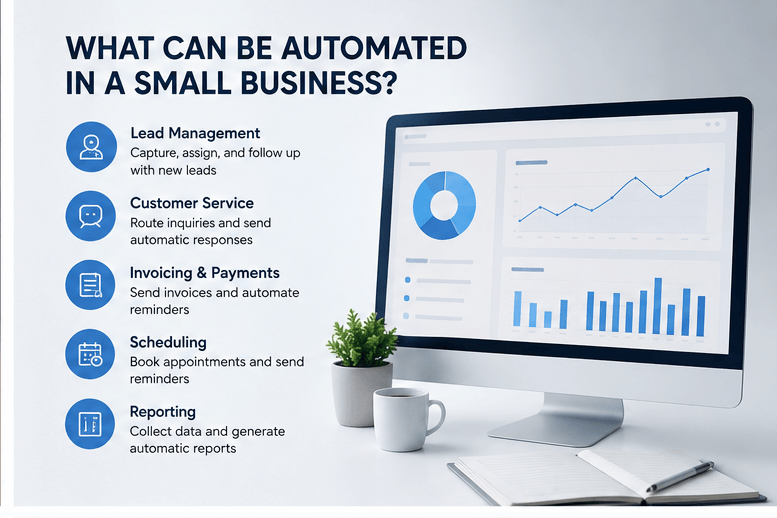
Process
Lead management
Customer service
Invoicing and finance
Scheduling
Reporting
What can be automated?
Capture enquiries, assign leads, create CRM records, and schedule follow-ups
Categorise messages, route tickets, and draft routine replies
Prepare invoice records, send reminders, and flag overdue payments
Send booking confirmations, reminders, and follow-up messages
Collect data and prepare recurring summaries
Where people remain important
Qualifying prospects and managing sales conversations
Complaints, sensitive issues, and unusual requests
Approving payments and resolving discrepancies
Managing exceptions and customer-specific needs
Interpreting results and choosing the next action
Consider a small consultancy that receives enquiries through its website. An employee currently copies each enquiry into a spreadsheet, emails the sales team, and remembers to follow up the next day.
An automated workflow could create a CRM record, notify the assigned salesperson, and schedule a reminder if the lead hasn't been contacted.
The salesperson still assesses the opportunity. Automation simply reduces the chance that an enquiry gets overlooked.
These are illustrative scenarios, not verified Unboxed Automation client outcomes.
Editorial requirement: Before publication, insert one approved Unboxed Automation client example here. Ask Rob Robertson for the client's original problem, what was automated, the verified outcome, and written permission to publish. If no approved example is available, retain an explicit editorial placeholder and do not present an illustrative scenario as a real client case study.
example is available, retain an explicit editorial placeholder and do not present an illustrative scenario as a real client case study.
How can AI agents for business help in 2026?
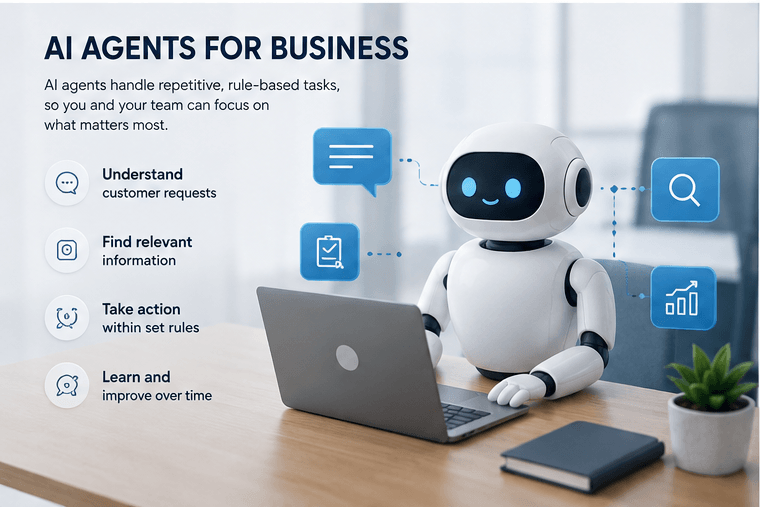
AI agents for business can interpret information and perform defined tasks toward a goal, within the permissions and safeguards you set.
A conventional workflow might send an acknowledgement whenever a customer submits a form. An AI-enabled workflow could classify the enquiry, identify the relevant service, summarise the customer's needs, and draft a response for an employee to review.
An AI agent may be useful when the input is less predictable than a simple form field. Examples include:
Categorising incoming customer emails.
Extracting details from documents.
Summarising conversations for sales or support teams.
Finding relevant information in approved internal documents.
Recommending a next step based on predefined business rules.
An automation platform connects the applications and coordinates the steps; an AI model handles tasks such as interpreting language or generating a summary.
However, AI agents can misunderstand requests or produce incorrect information. Limit their access to the data and actions they need, log important actions, test unusual cases, and require human approval for consequential decisions.
Payments, legal commitments, sensitive customer complaints, and other high-impact actions should have appropriate review controls.
The sensible starting point is a low-risk task with a clear definition of success—not an unrestricted agent making important business decisions.
Which business automation tools are best: Zapier vs Make vs n8n?
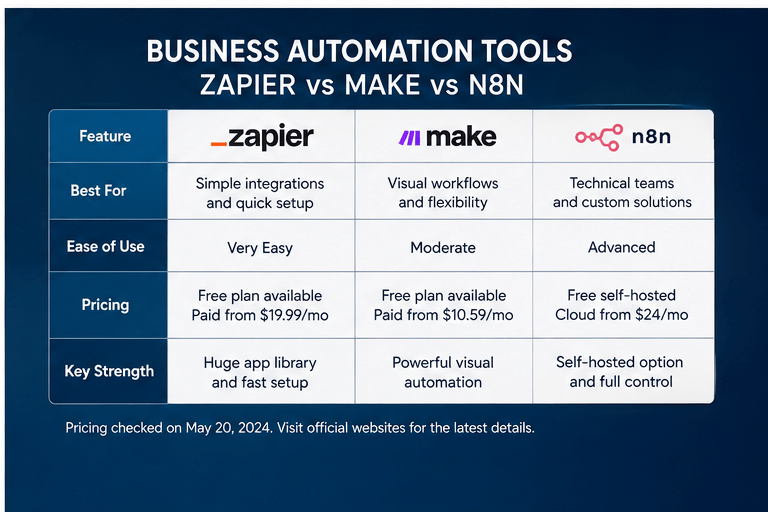
Zapier, Make, and n8n all connect applications and automate workflows, but they differ in their apZapier, Make, and n8n all connect applications and automate workflows, but they differ in their approach, usage limits, and technical requirements.
proach, usage limits, and technical requirements.
Zapier: best for straightforward app integrations
Zapier is a practical choice for businesses that want to connect popular apps without building custom integrations.
For example, a new online enquiry could create a CRM contact, send a notification, and generate a follow-up task.
Strengths: An accessible visual builder, a broad integration ecosystem, and support for multi-step workflows on paid plans.
Limitations: Each successful action can consume tasks, so costs can rise with workflow volume. More advanced features and higher usage may require a paid tier.
Best for: Small teams that value quick setup and ease of use.
Official pricing: Zapier plans.
Make: best for visual, multi-step workflows
Make is suited to businesses that need branching logic, filters, and greater control over how information moves between applications.
For example, an enquiry could be routed to different salespeople based on location, service type, or lead source.
Strengths: A visual scenario builder, flexible data handling, and useful controls for complex workflows.
Limitations: More involved scenarios can be harder to build and troubleshoot. Each module action typically consumes credits, so the design of a workflow affects usage.
Best for: Businesses that need more control over multi-step workflows without building a fully custom system.
Official pricing: Make plans.
n8n: best for technical flexibility
n8n is worth considering when you need custom integrations, API connections, or control over where your automation runs.
An API, or application programming interface, lets software systems exchange information. n8n supports custom workflows that can connect applications and services through integrations and APIs.
Strengths: Flexible workflow logic, customisation, and both cloud-hosted and self-hosted options.
Limitations: Self-hosting requires technical knowledge and responsibility for deployment, security, backups, updates, and monitoring. Cloud plans have usage limits too.
Best for: Technical teams or businesses that need greater control and are comfortable managing a more involved setup.
Official pricing: n8n plans.
How much do Zapier, Make, and n8n cost?
The following starting prices were checked on 23 October 2026 against the providers' official pricing pages.
Tool
Zapier
Make
n8n Cloud
Published starting option
Free: $0/month; Professional from $19.99/month
Free: $0/month; Core from $12/month at 10,000 credits/month
Starter:
€20/month, billed annually, for 2,500 executions/month
Usage mode
Tasks
Credits
Workflow executions
Main consideration
Each successful action may count toward usage
Module actions generally consume credits
A workflow execution can contain multiple steps
Sources: Zapier pricing, Make pricing, n8n pricing.
These are starting prices, not equivalent packages. Zapier's Professional price is the published starting rate, Make's Core figure is for 10,000 monthly credits, and n8n's Starter price is in euros with annual billing. Features, taxes, currencies, and usage allowances may vary.
The billing models matter. A workflow that performs several actions may consume several Zapier tasks or Make credits. n8n Cloud measures workflow executions rather than charging separately for each step, although plan limits still apply.
n8n also offers a self-hosted Community edition. While the software can be used without a subscription in qualifying circumstances, infrastructure and maintenance are not necessarily free. Check the n8n license guidance if you intend to use it commercially.
Which tool should you choose? Start with Zapier if ease of setup is the priority, Make if you need more visual control over branching workflows, and n8n if technical flexibility or self-hosting is important. Test your actual workflow and estimate monthly usage before committing.
How much does business automation cost beyond software?
The total cost of business automation includes more than the subscription. Budget for four areas:
Software: Platform subscriptions, additional integrations, and any AI usage charges.
Implementation: Time spent mapping processes, building workflows, testing integrations, and fixing initial problems.
Maintenance: Monitoring errors, updating connections, and adjusting workflows as business needs change.
Risk controls: Access permissions, approvals, logging, backups, and security measures appropriate to the process.
A simple workflow using existing apps may need little configuration. A custom integration involving several systems, sensitive information, or AI-based decisions may require more development and ongoing support.
There is no single reliable price for every project. Cost depends on the number of workflows, complexity, usage, technical requirements, and support arrangements.
How can you estimate the return on business automation?
Use your own numbers rather than relying on generic savings claims.
For example, suppose a business spends 30 minutes each working day transferring lead details between systems. Across 22 working days, that's 11 hours per month.
If automation eliminates 80% of that work, the estimated time saved is 8.8 hours per month.
This is an illustration, not a guaranteed result. It assumes the workflow operates reliably and doesn't create equivalent work in monitoring or correcting mistakes.
To estimate the financial value, multiply the genuinely saved hours by the relevant hourly labour cost. Then subtract software, implementation, and maintenance costs over the same period.
Also measure improvements such as faster responses, fewer missed tasks, and more consistent customer service. Don't assign a monetary value to those benefits without evidence.
What should you check before launching an automated workflow?
Before relying on an automation every day, confirm that it works beyond the ideal scenario.
Accuracy: Does the right information reach the right application?
Duplicates: What happens if an event is processed twice?
Failure alerts: Will someone know if a connection breaks?
Permissions: Does the workflow access only the data and actions it needs?
Human approval: Which actions require review before completion?
Documentation: Can another team member understand and maintain the workflow?
Ownership: Who monitors performance and responds to failures?
AI-powered workflows need additional checks for incorrect outputs and inappropriate actions. Start with low-risk tasks, keep clear boundaries, and introduce stronger approval controls wherever mistakes could affect customers, finances, or compliance.
What should your business automate next?
Choose one recurring task that wastes time or creates avoidable errors. Document the process, select a tool that fits your budget and technical ability, and test the workflow before expanding it.
Zapier is a sensible starting point for straightforward app connections. Make offers more visual control over multi-step processes. n8n is useful when technical flexibility or self-hosting matters.
AI agents can help with less predictable tasks, but they work best with reliable information, defined permissions, and human oversight.
The best business automation strategy isn't the one with the most tools. It's the one that solves a real business problem and delivers a measurable improvement.
Suggested call to action: Want to identify the right process to automate first? Talk to Unboxed Automation about your business workflows and explore an approach that fits your goals.
[EDITORIAL REVIEW REQUIRED: Confirm Unboxed Automation's actual service offering and approved contact URL before using this call to action.]
Frequently asked questions
1. What is the best business automation for a small business?
Start with a repetitive, rules-based task that happens frequently and causes avoidable delays or errors. Lead capture, appointment reminders, invoice reminders, and recurring reports are common candidates.
2. Can I automate my business without coding?
Yes. Zapier and Make offer visual workflow builders that can connect applications without requiring you to write code. More complex integrations and self-hosted systems may need technical support.
3. Are AI agents better than traditional automation?
Not always. Traditional automation is often more predictable for clearly defined rules. AI agents are useful for interpreting text, summarising information, and recommending next steps. Many businesses benefit from combining both.
4. Is n8n cheaper than Zapier or Make?
It depends on usage, hosting, maintenance, and technical requirements. n8n has a self-hosted Community edition, but operating infrastructure still has costs. Compare the total cost of ownership rather than subscription prices alone.
5. How do I know whether business automation is working?
Measure time saved, error rates, missed tasks, processing delays, and maintenance effort before and after implementation. Compare the improvement with the total cost of software and implementation.
Author bio — approval required
[DO NOT PUBLISH UNTIL ROB APPROVES]
Insert Rob Robertson's approved author bio, including only verified credentials, relevant experience, and any approved professional links. Do not invent qualifications, years of experience, or client outcomes.
Sources and editorial review checklist
Official sources
Zapier pricing — plan prices, task-based usage, and feature availability. Checked 23 October 2026.
Make pricing — plan prices, credit allowances, and scenario usage. Checked 23 October 2026.
n8n pricing — Cloud plan prices and execution allowances. Checked 23 October 2026.
n8n license guidance — conditions for the self-hosted Community edition.


© 2026 - Unboxed Automation. All rights reserved